Care Hub Latency that is NOT widespread

Modified on Mon, Apr 14 at 9:12 AM

Feature Overview 


What is the expected behavior of this feature?


  • If you are experiencing latency in the Care Hub, please try these steps to see if if corrects the issue. 
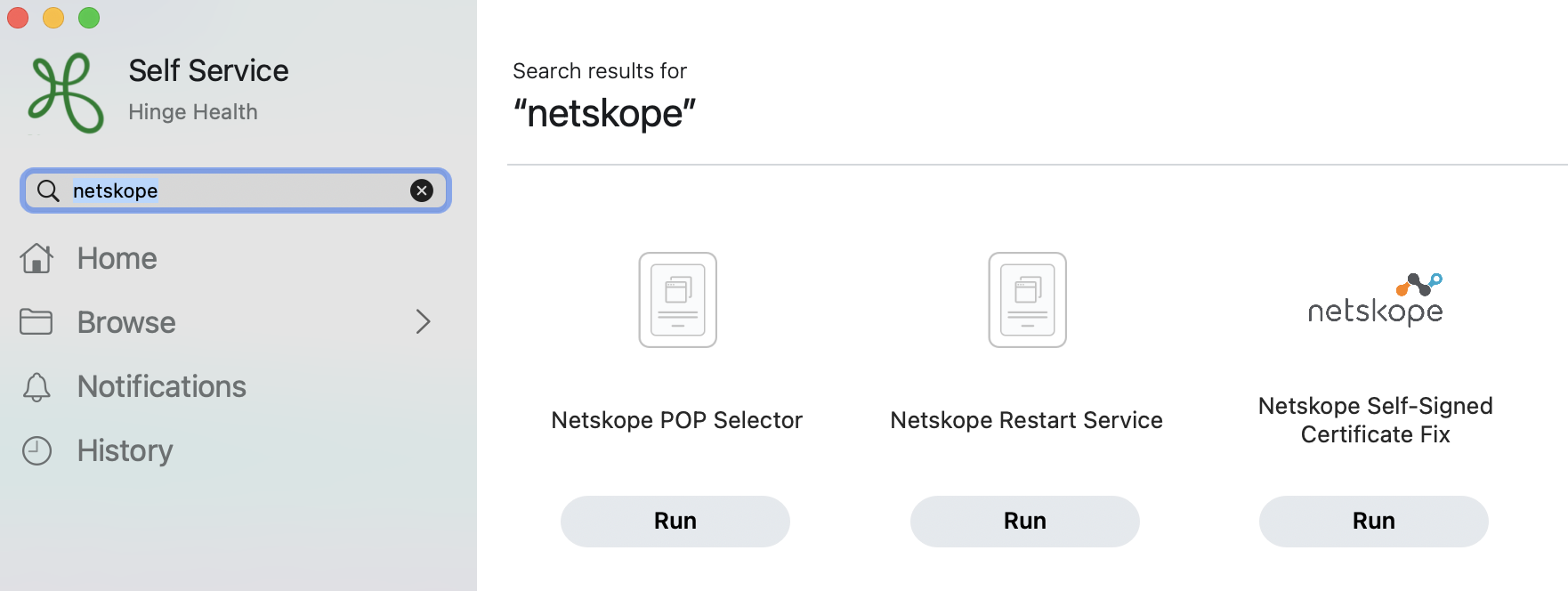
    • Search "Self Service" with the top right corner magnifying glass. 
      • Then Search Netskope in the left side of the app.
      • From there Select "RUN" under Netskope Restart Service.

    • If this step doesn't work, please clear cache/ cookies.
    • If these steps don't work, please escalate to your manager and/ or submit a Freshdesk ticket. 


What is the location in Care Hub?


  • Top Right Corner of your Macbook. 


Troubleshooting

What general best practices can I implement before filing a ticket?  

If the steps above don't address your concerns, please review Ticketing Best Practices or the additional information below.  

Where can I look for additional information?  


Was this article helpful?

That’s Great!

Thank you for your feedback

Sorry! We couldn't be helpful

Thank you for your feedback

Let us know how can we improve this article!

Select at least one of the reasons
CAPTCHA verification is required.

Feedback sent

We appreciate your effort and will try to fix the article